
一篇文章带你了解CSS3 背景知识
CSS3中包含几个新的背景属性 , 提供更大背景元素控制 。
一、浏览器支持表中的数字指定完全支持该属性的第一个浏览器版本 。
数字后面的 -webkit- 或者 -moz- 使用时需要指定前缀 。
属性ChromeFirefoxSafariOperaIEbackground-image (多背景)4.09.03.63.111.5background-size4.0 1.0 -webkit-9.04.0 3.6 -moz-4.1 3.0 -webkit-10.5 10.0background-origin1.09.04.03.010.5background-clip4.09.04.03.010.5
二、CSS3 多背景CSS3允许你为一个元素添加多个背景图像, 通过使用 background-image 属性.不同的背景图像用逗号隔开 , 图像叠加在一起 ,
【一篇文章带你了解CSS3 背景知识】例:有两个背景图像 , 第一图像是背景图(在右下角)和第二图像是一个GIF动图(在左上角) 。
代码如下:
项目#example1 {background-image: url(img/fy_indexBg.jpg), url(img/17I_hd.mp4.gif);background-position: right bottom, left top;background-repeat: no-repeat, repeat;}Lorem Ipsum DolorLorem ipsum dolor sit amet, consectetuer adipiscing elit, sed diam nonummy nibh euismod tincidunt ut laoreet dolore magna aliquam erat volutpat.

Ut wisi enim ad minim veniam, quis nostrud exerci tation ullamcorper suscipit lobortis nisl ut aliquip ex ea commodo consequat.
 文章插图
文章插图
可以使用单独的背景属性(如上所示)或背景简写属性指定多个背景图像 。
下面的例子使用了背景速记
(上面的例子 , 有相同的结果)
#example1 {background: url(img_flwr.gif) right bottom no-repeat, url(paper.gif) left top repeat;}1. CSS3 背景尺寸CSS3 background-size 属性允许你指定背景图像的尺寸.
在CSS3之前的背景图像大小是图像的实际大小 。 CSS3允许我们使用背景图像在不同的上下文中 。
size可以指定长度、百分比 , 或通过使用一个关键词: contain 或者 cover.
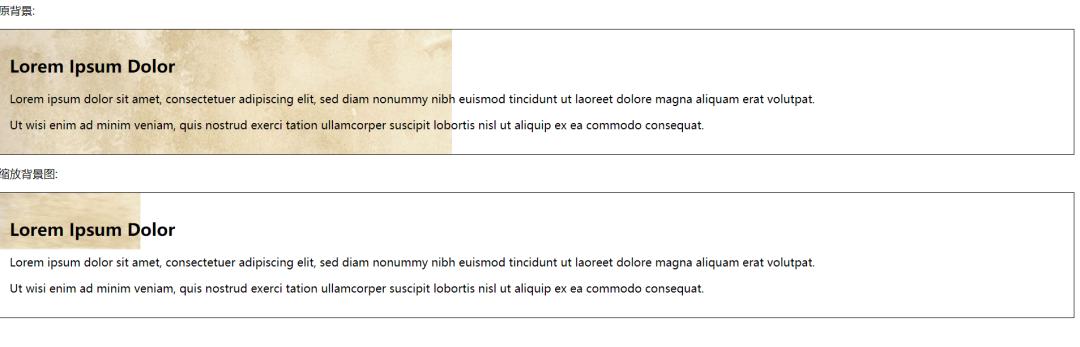
示例:图片背景图像比原图像小得多(以像素为单位):
代码如下:
项目#example1 {border: 1px solid black;background:url(img_flwr.gif);background-repeat: no-repeat;padding:15px;}#example2 {border: 1px solid black;background:url(img_flwr.gif);background-size: 100px 80px;background-repeat: no-repeat;padding:15px;}原背景:

Lorem Ipsum DolorLorem ipsum dolor sit amet, consectetuer adipiscing elit, sed diam nonummy nibh euismod tincidunt ut laoreet dolore magna aliquam erat volutpat.

Ut wisi enim ad minim veniam, quis nostrud exerci tation ullamcorper suscipit lobortis nisl ut aliquip ex ea commodo consequat.

缩放背景图:

Lorem Ipsum DolorLorem ipsum dolor sit amet, consectetuer adipiscing elit, sed diam nonummy nibh euismod tincidunt ut laoreet dolore magna aliquam erat volutpat.

Ut wisi enim ad minim veniam, quis nostrud exerci tation ullamcorper suscipit lobortis nisl ut aliquip ex ea commodo consequat.
 文章插图
文章插图
background-size 属性两个可能值是:contain 和 cover.
含有关键词尺度的背景图像尽可能大的(但它的宽度和高度必须在内容区域) 。 因此 , 根据背景图像的比例和背景区的定位 , 有可能不被背景图像覆盖 。
cover 关键词缩放背景图像 , 内容区域完全覆盖了背景图像(它的宽度和高度等于或超过该范围的内容) 。 因此 , 背景图像的某些部分可能不在背景区的定位是可见的 。
下面的示例演示了使用contain和cover:
#div1 {background: url(img_flower.jpg);background-size: contain;background-repeat: no-repeat;}#div2 {background: url(img_flower.jpg);background-size: cover;background-repeat: no-repeat;}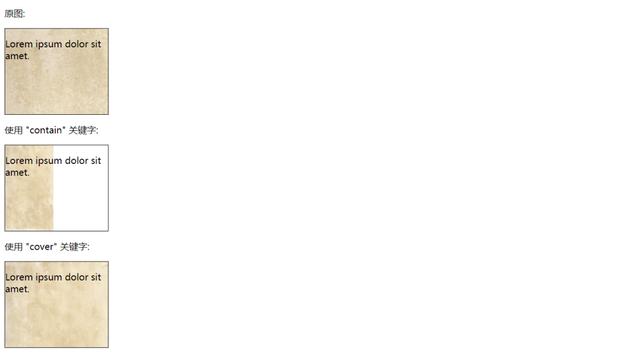 文章插图
文章插图
2. 定义多个尺寸的背景图像background-size 属性也接受多个背景值(使用逗号分隔列表) , 当处理多个背景时 。
下面的示例指定三个背景图像 , 每个图像具有不同的background-size值:
项目#example1 {background: url(img/fy_indexBg.jpg) left top no-repeat, url(img/fy_indexBg.jpg) right bottom no-repeat, url(img/17I_hd.mp4.gif) left top repeat;padding: 15px;background-size: 50px, 130px, auto;color: white;}Lorem Ipsum DolorLorem ipsum dolor sit amet, consectetuer adipiscing elit, sed diam nonummy nibh euismod tincidunt ut laoreet dolore magna aliquam erat volutpat.

Ut wisi enim ad minim veniam, quis nostrud exerci tation ullamcorper suscipit lobortis nisl ut aliquip ex ea commodo consequat.
 文章插图
文章插图
3. 全尺寸的背景图片如果希望在一个覆盖整个浏览器窗口的网站上有一个背景图像 。 .
- 占营收|华为值多少钱
- 商品|问道自有品牌,山姆多方博弈
- 公式|?有人把 5G 讲得这么简单明了
- 责令|1336款APP被责令整改,三大问题突出
- 长庚君|向小米公司致歉
- “天河优创”放榜
- 广东移动OTN精智专网,助力千行百业数字化转型
- 快的秒回,慢的等了近一天
- 制药领域|为什么AI制药这么火,为什么是现在?
- 介绍|5分钟介绍各种类型的人工智能技术